This site uses cookies for analytics and to improve your experience. By clicking Accept, you consent to our use of cookies. Learn more in our privacy policy.
More 5-star reviews. More guests. Without burning out.
Table Hype is the all-in-one review and marketing platform built specifically for independent restaurants. Built by indie restaurant people. Priced for indie restaurant budgets. Zero commissions, ever. Keep more of what you earn and invest in the long-term growth of your restaurant.
More 5-star reviews. More guests. Without burning out.
Table Hype is the all-in-one review and marketing platform built specifically for independent restaurants. Built by indie restaurant people. Priced for indie restaurant budgets. Zero commissions, ever. Keep more of what you earn and invest in the long-term growth of your restaurant.
Turn your best reviews into social content — automatically.
The reality
Your best reviews are sitting on your Google profile right now. Five-star, glowing, the kind that would convince anyone to drive across town to eat at your place.
The problem? The only people seeing them are the ones who already searched for you on Google.
Your future customers — the ones scrolling Instagram while they decide where to eat tonight — never see them. Your best marketing asset is hidden on the platform where it does the least good for new customers.
Almost no restaurant is doing anything about this. It’s the easiest social media win there is, and almost everyone misses it.
What Table Hype does
Auto-posting of your best reviews to Instagram and Facebook. When a 4-star or 5-star review comes in, Table Hype turns it into a branded social graphic and posts it automatically. Your guest’s words. Your colors. Your logo. No design work required.
Branded graphics in your colors and fonts. Set up your brand template once during onboarding. Every auto-post matches. Your feed looks intentional and on-brand — without a designer.
A review widget for your website. Embed a clean, customizable review feed on your homepage or about page. Visitors see fresh 5-star reviews without leaving your site. Most restaurants see measurable conversion lift after adding this.
Full control over what gets shared. Set thresholds — only 5-stars, only reviews mentioning specific dishes, only reviews from verified guests. Approve every post before it goes live, or let it run on full auto. Your choice.
Real Example
Branded Instagram Posts Done For You
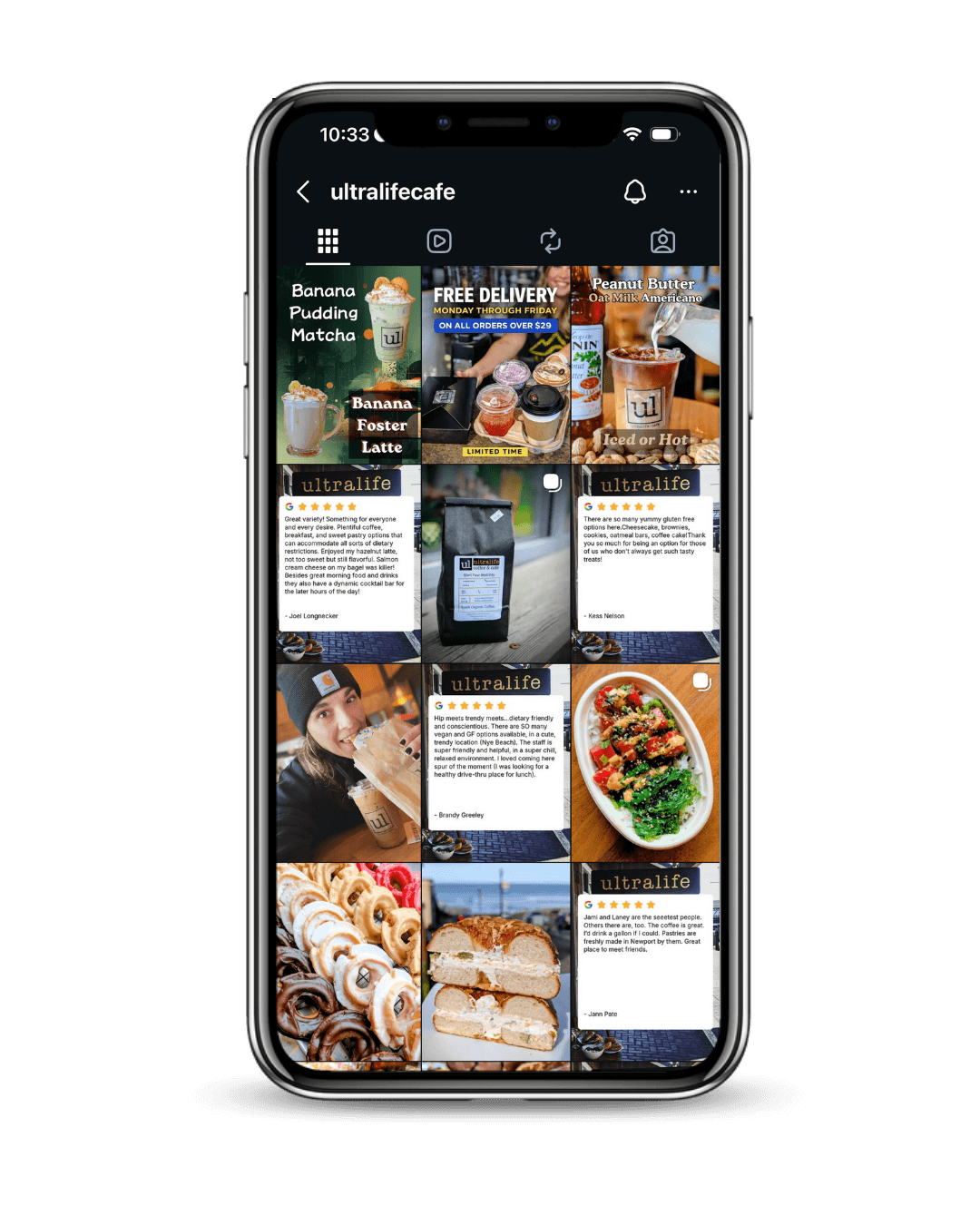
Matthew at Ultralife Cafe wasn’t posting to Instagram regularly before we set this up. He didn’t have time, and frankly, didn’t know what to post most days.
After we turned on auto-posting, his Instagram grid filled with branded review posts on a steady cadence. His follower count grew. His engagement rate went up because the posts were authentic. And the content was completely on-brand — without spending hours on it.
The template stays consistent (which is good for branding), but each post features a different guest’s words, different highlighted text, and different design accents to keep the feed visually fresh. If you want a fresh branded graphic each month, it’s easy to change.
Can I still post my own content?
Of course. The auto-posts run alongside whatever you and your team post manually. Most Table Hype restaurants use auto-posts for consistency and their own posts for events, menu launches, and team highlights.
Can my team use it too?
Yes. You can add your manager, marketing lead, or front-of-house lead as team members so they can monitor and respond on your behalf — all under one account.
What if a review has a typo or weird phrasing?
You can edit any review text before it posts as a graphic, while preserving the original review on Google. The auto-post system flags reviews that are too long or unusually formatted so you can decide.
Will Instagram penalize me for “automated” posts?
No. Instagram only penalizes posts that violate their terms (spam, inauthentic engagement, etc.). Sharing authentic customer reviews is exactly the kind of content the platform encourages.
Does it work for restaurants with multiple locations?
Yes. You can manage all locations from one account, with filtered feeds per location and a roll-up dashboard across all of them.
See where you stand right now
Want to see which of your existing reviews would make the best social content — and how much you’d gain by sharing them consistently? Your free reputation report includes a section on your highest-performing reviews and the social proof you’re currently sitting on.